Icon of program: MyPaint

MyPaint for Windows

Free Download for Windows

View an ad to download for free

Mireia Fernandez Cristia

Updated 9 months ago

MyPaint: A Free Graphics Design Tool for Windows

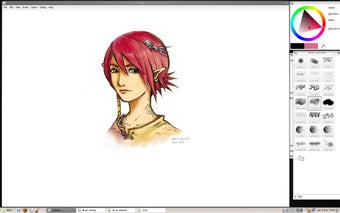
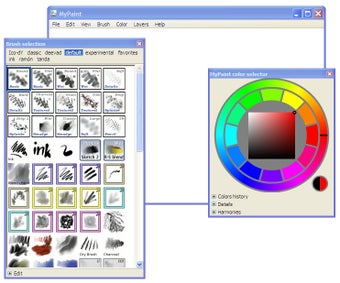
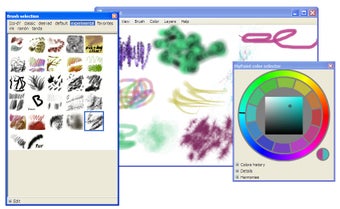
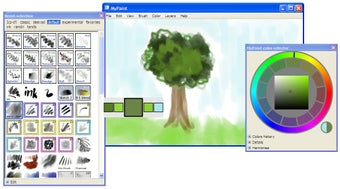
MyPaint is a free multimedia application designed for graphic and design enthusiasts using Windows. This software focuses on providing a user-friendly interface that allows artists to create digital paintings and sketches with ease. It offers a variety of brushes and tools that simulate traditional painting techniques, making it an ideal choice for both beginners and experienced artists. MyPaint also supports unlimited canvas sizes and provides a distraction-free workspace to enhance creativity.

Unlock your creativity with Adobe Stock

Get 10 images or 1 video with a free trial

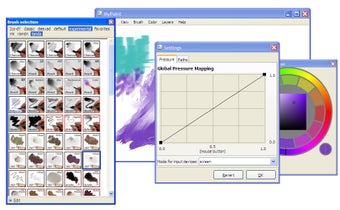
In addition to its robust painting features, MyPaint supports pressure-sensitive tablets, allowing for a more natural drawing experience. Users can customize their brush settings and create unique textures, further expanding their artistic possibilities. With its open-source nature, MyPaint encourages community contributions, ensuring continuous improvements and updates. Overall, MyPaint is a versatile tool for anyone looking to explore digital art.


Mireia Fernandez Cristia

Mireia Fernández has over a decade of experience as an editor, with a focus on software reviews, tutorials, and gaming guides. Her background in technology and long-standing passion for video games shape her clear and practical style when analyzing tools and trends.

 0/5

App specs

  • Developer

  • License

    Free

  • Version

    2.0.1
  • Latest update

  • Platform

    Windows

    Other platforms (1)
  • OS

    Windows 2000

  • Language

    English

  • Downloads

    244.4K

    Last month's downloads

    • 178
  • Size

    38.03 MB

Also available in other platforms

Program available in other languages


Icon of program: MyPaint

MyPaint for PC

Free Download for PC

View an ad to download for free


User reviews about MyPaint

3.7

6 reviews

Add review

Main reviews for you

  • Anonymous user

    I use Mypaint mostly for pen-drawings because of the dynamics with wich it reproduces the pen-pressure on my XP-PEN Artist 12 Pro screen drawing tablet.
  • Anonymous user

    My Paint is a great drawing app that I use for my art and it turnsout great. I think my paint is a great writing app and can be used easily!

  • Anonymous user

    Only works for one day I say it is a waste ofmspace. I liked if for a day! The next day I tried playing the thing would not load! I am gonna try different apps I will keep it just in case. Pros: I can be creaive! Cons: THAT IT WORKS FOR MORE THAN A DAY

  • Anonymous user

    It's fantastic!. it's fantastic and intresting.i love this very much because it has amusing drawings that we can do! Pros: I like most the intresting new brushes Cons: no i had nothing missing

  • Anonymous user

    My Problems. I have this latest version, but I have encountered a few problems. The program is great, it's really helping me, has many awesome brushes and is easy to use. Now, my first problem, my BIG problem, is that my tablet does not work with this program. I have a Genius MousePen 8x6, and it works fine with other programs. What happens is: I open a new file, select a brush using the tablet pen and draw a line on the screen. The line does not appear in the middle of the screen, but squashed up on the side. There seems to be a barrier, if I draw a line horizontally it stops appearing at a certain point. Make sense?It is utterly baffling and hyperbly annoying.And it's hard to draw with a mouse.Can anyone help? Is it a bug with the program??/// My other question is: is there a fill bucket for this program? Can I download it somewhere? It would be very helpful if I could find one.Great work on the program. :)

  • Anonymous user

    MyPaint 0.8.2. This is the best program ever to draw. It has so many types of brushes and other awesome features, but it has some problems. Whenever I try to save my drawings, there's an error and the same thing happens when I try to open an image. Its very inconvienient and I was wondering if this could be fixed. Thanks

More

You may also like

Alternatives to MyPaint

Explore Apps

Latest articles

Laws concerning the use of this software vary from country to country. We do not encourage or condone the use of this program if it is in violation of these laws.
Softonic

Is MyPaint safe?

98/100

Score result: Clean

This file passed a comprehensive security scan using VirusTotal technology. It is safe to download.

  • Virus free
  • Spyware free
  • Malware free
  • Verified by Security Partners

    VirusTotal logo

Scan Info

Last scan
Sunday, November 12, 2023
Scan provider
VirusTotal · Full report

File Integrity

File
mypaint-w32-2.0.1-installer.exe
SHA256
a5b316c480ab0fe5f46f868f0238afa8301adeef4743dfc8ece5b4b186d4f6cf
SHA1
16536340d81cc5f580f915c4bdf4f73af4273a76

Softonic security commitment

MyPaint has been thoroughly scanned by our advanced security systems and verified by industry-leading partners. This file comes from the official developer and has passed all our security checks, showing no signs of viruses, malware, or spyware. For more information, visit our Security and Trust Center

Signed in to Softonic as